> ## Documentation Index
> Fetch the complete documentation index at: https://invopop-fi-party-endpoints.mintlify.site/llms.txt
> Use this file to discover all available pages before exploring further.

# ZATCA supplier registration in Saudi Arabia

> Onboard a Saudi VAT-registered party with ZATCA and provision its production CSID.

export const WorkflowDiagram = ({workflow}) => {
  const stateColors = {
    processing: "yellow",
    sent: "blue",
    received: "blue",
    registered: "green",
    completed: "green",
    error: "red"
  };
  const StateChip = ({state, label}) => <Badge size="sm" color={stateColors[state] || "gray"} icon="square-small" iconType="solid">
      {label.charAt(0).toUpperCase() + label.slice(1)}
    </Badge>;
  const providerIcons = {
    "silo.state": "https://silo.invopop.com/images/status.svg",
    "silo.close": "https://silo.invopop.com/images/check-badge.svg",
    "silo.if": "https://assets.invopop.com/apps/silo/if.svg",
    "silo.folder": "https://silo.invopop.com/images/folder.svg",
    "silo.modify": "https://silo.invopop.com/images/modify.svg",
    "silo.correct": "https://silo.invopop.com/images/replace.svg",
    "silo.sleep": "https://assets.invopop.com/icons/sleep.svg",
    silo: "https://assets.invopop.com/apps/silo/icon.svg",
    "sequence.enumerate": "https://sequence.invopop.com/images/enumerate.svg",
    "transform.job.create": "https://transform.invopop.com/images/jobs.svg",
    webhook: "https://webhook.invopop.com/icon.svg",
    lookup: "https://lookup.invopop.com/icon.png",
    dropbox: "https://dropbox.invopop.com/icon.png",
    pdf: "https://pdf.invopop.com/file-pdf.svg",
    peppol: "https://assets.invopop.com/apps/peppol/icon.svg",
    ubl: "https://assets.invopop.com/apps/ubl/logo.svg",
    cii: "https://assets.invopop.com/apps/cii/logo.svg",
    "gov-dk": "https://assets.invopop.com/flags/dk.svg",
    "gov-fi": "https://assets.invopop.com/flags/fi.svg",
    "gov-fr": "https://assets.invopop.com/flags/fr.svg",
    "chorus-pro": "https://assets.invopop.com/apps/chroruspro/icon.svg",
    "gov-es": "https://assets.invopop.com/apps/gov-es/icon.svg",
    "gov-es.sii": "https://assets.invopop.com/apps/sii/icon.svg",
    "gov-es.ticketbai": "https://assets.invopop.com/apps/ticketbai/icon.svg",
    "gov-es.facturae": "https://assets.invopop.com/apps/facturae/icon.svg",
    verifactu: "https://assets.invopop.com/apps/verifactu/icon.svg",
    "gov-pl": "https://assets.invopop.com/apps/ksef/icon.svg",
    "gov-sa": "https://assets.invopop.com/apps/zatca/icon.svg",
    "gov-ar": "https://assets.invopop.com/apps/arca/icon.svg",
    "at-pt": "https://assets.invopop.com/apps/at-pt/icon.svg",
    "sat-mx": "https://assets.invopop.com/apps/sat-mexico/icon.svg",
    "sw-sapien": "https://assets.invopop.com/apps/sw-sapien/icon.svg",
    "sdi-it": "https://assets.invopop.com/apps/sdi-italy/icon.svg",
    "ticket-it": "https://assets.invopop.com/apps/agenzia-entrate/icon.svg",
    "nfe-br": "https://assets.invopop.com/apps/notas-fiscais-eletronicas-brazil/icon.svg",
    chargebee: "https://assets.invopop.com/apps/chargebee/icon.svg",
    stripe: "https://assets.invopop.com/apps/stripe/icon.svg",
    email: "https://assets.invopop.com/apps/email/icon.svg",
    cron: "https://assets.invopop.com/apps/cron/icon.svg",
    ilyda: "https://assets.invopop.com/apps/ilyda/icon.svg",
    invoicexpress: "https://assets.invopop.com/apps/invoicexpress/icon.svg",
    plemsi: "https://assets.invopop.com/flags/co.svg"
  };
  const iconFor = provider => {
    const parts = (provider || "").split(".");
    for (let i = parts.length; i > 0; i--) {
      const url = providerIcons[parts.slice(0, i).join(".")];
      if (url) return url;
    }
    return null;
  };
  const StepIcon = ({provider}) => {
    const url = iconFor(provider);
    return <span title={provider} className="flex h-7 w-7 shrink-0 items-center justify-center rounded-md border border-gray-950/10 bg-white dark:border-white/10 dark:bg-white/5">
        {url ? <img src={url} alt="" className="h-4 w-4" /> : null}
      </span>;
  };
  const renderSummary = summary => {
    const nodes = [];
    const re = /`([^`]+)`(\{[^}]*\})?/g;
    let last = 0;
    let m;
    let k = 0;
    while ((m = re.exec(summary)) !== null) {
      if (m.index > last) nodes.push(summary.slice(last, m.index));
      const attrs = m[2] || "";
      if (attrs.indexOf(".state") >= 0) {
        const state = (attrs.match(/\.state\s+\.([\w-]+)/) || [])[1] || m[1];
        nodes.push(<StateChip key={k++} state={state} label={m[1]} />);
      } else if (attrs) {
        nodes.push(<span key={k++} className="text-sm font-medium text-gray-700 dark:text-gray-300">
            {m[1]}
          </span>);
      } else {
        nodes.push(<code key={k++} className="text-sm rounded bg-gray-100 px-1 font-mono text-sm dark:bg-white/10">
            {m[1]}
          </code>);
      }
      last = m.index + m[0].length;
    }
    if (last < summary.length) nodes.push(summary.slice(last));
    return nodes;
  };
  const NoteRow = ({text}) => <div className="mt-4 mb-1 font-mono text-sm leading-5 text-gray-400 dark:text-gray-500">{"// " + text}</div>;
  const renderSteps = (steps, counter) => (steps || []).map(step => {
    counter.n += 1;
    const n = counter.n;
    const branches = (step.next || []).filter(b => b.steps && b.steps.length > 0);
    return <div key={step.id || "step-" + n}>
          {step.notes ? <NoteRow text={step.notes} /> : null}
          <div className="mt-2.5 flex items-center">
            <span className="absolute left-0 w-10 text-center font-mono text-sm text-gray-400 select-none dark:text-gray-500">
              {n}
            </span>
            <div className="flex min-w-0 flex-1 items-center gap-2 rounded-xl border border-gray-950/5 bg-white px-2 py-2 dark:border-white/10 dark:bg-gray-900">
              <StepIcon provider={step.provider} />
              <span className="text-sm shrink-0 font-medium text-gray-900 dark:text-gray-100">{step.name}</span>
              {step.summary ? <span className="text-sm min-w-0 truncate text-gray-500 dark:text-gray-400">{renderSummary(step.summary)}</span> : null}
            </div>
          </div>
          {branches.length > 0 ? <div className="ml-5 border-l border-gray-200 -my-1 py-1 pl-6 dark:border-white/10">
              {branches.map((branch, bi) => <div key={branch.code || branch.status || bi}>
                  <div className="mt-4">
                    <span className="rounded-md bg-gray-200/70 px-2 py-1 font-mono text-sm text-gray-600 dark:bg-white/10 dark:text-gray-300">
                      {branch.code || branch.status}
                    </span>
                  </div>
                  {renderSteps(branch.steps, counter)}
                </div>)}
            </div> : null}
        </div>;
  });
  const counter = {
    n: 0
  };
  const wf = workflow || ({});
  return <div className="not-prose relative my-5 rounded-2xl border border-gray-950/5 bg-gray-50 py-3 pr-4 pb-5 pl-12 dark:border-white/10 dark:bg-white/[0.03]">
      {renderSteps(wf.steps, counter)}
      {wf.rescue && wf.rescue.length > 0 ? <div className="mt-6 border-t border-dashed border-gray-300 dark:border-white/10">
          <NoteRow text="If any step fails" />
          {renderSteps(wf.rescue, counter)}
        </div> : null}
    </div>;
};

export const saUnregisterWorkflow = {
  "name": "ZATCA unregister supplier",
  "description": "Removes a supplier's registration from Invopop's internal systems",
  "schema": "org/party",
  "steps": [{
    "id": "572ac450-6fcf-11f1-b09d-79f60b032746",
    "name": "Set state",
    "provider": "silo.state",
    "summary": "Set state to `processing`{.state .processing}",
    "config": {
      "state": "processing"
    }
  }, {
    "id": "5c0e9910-6fcf-11f1-b09d-79f60b032746",
    "name": "Unregister supplier from ZATCA",
    "provider": "gov-sa.party.unregister"
  }, {
    "id": "5e800e40-6fcf-11f1-b09d-79f60b032746",
    "name": "Set state",
    "provider": "silo.state",
    "summary": "Set state to `void`{.state .void}",
    "config": {
      "state": "void"
    }
  }],
  "rescue": [{
    "id": "60e4d940-6fcf-11f1-b09d-79f60b032746",
    "name": "Set state",
    "provider": "silo.state",
    "summary": "Set state to `error`{.state .error}",
    "config": {
      "state": "error"
    }
  }]
};

export const saRegisterWorkflow = {
  "name": "ZATCA register supplier",
  "description": "Registers a supplier with ZATCA and provisions its production CSID",
  "schema": "org/party",
  "steps": [{
    "id": "f60b2e30-6fce-11f1-b09d-79f60b032746",
    "name": "Set state",
    "provider": "silo.state",
    "summary": "Set state to `processing`{.state .processing}",
    "config": {
      "state": "processing"
    }
  }, {
    "id": "fd448bb0-6fce-11f1-b09d-79f60b032746",
    "name": "Register supplier with ZATCA",
    "provider": "gov-sa.party.register",
    "config": {
      "mode": "simulation"
    }
  }, {
    "id": "0064b770-6fcf-11f1-b09d-79f60b032746",
    "name": "Wait for OTP submission",
    "provider": "gov-sa.wait.authorization"
  }, {
    "id": "0236df60-6fcf-11f1-b09d-79f60b032746",
    "name": "Set state",
    "provider": "silo.state",
    "summary": "Set state to `registered`{.state .registered}",
    "config": {
      "state": "registered"
    }
  }],
  "rescue": [{
    "id": "04aa0240-6fcf-11f1-b09d-79f60b032746",
    "name": "Set state",
    "provider": "silo.state",
    "summary": "Set state to `error`{.state .error}",
    "config": {
      "state": "error"
    }
  }]
};

<Note>
  Registration is required for any Saudi VAT number that will clear or report invoices through Invopop. It is a prerequisite for the [clearance and reporting](/guides/sa-zatca-clearance-reporting) flow.
</Note>

## Sandbox environments

In sandbox, the **Register Party** step's configuration selects which ZATCA portal to onboard against. Production enrollments ignore this and always use the live endpoint.

| Mode | Target | OTP in the wizard | Use it to |
| - | - | - | - |
| `developer` | ZATCA Developer (sandbox) portal | **Dummy** — any placeholder value is accepted | Test the onboarding flow end to end without touching a real ZATCA account. |
| `simulation` (default) | ZATCA Simulation portal | **Real** — must be generated from the supplier's FATOORA Simulation account | Rehearse the production onboarding with genuine certificates and compliance checks before going live. |

The two modes target different ZATCA sandbox endpoints and differ mainly in how the OTP is treated:

* **Developer** is the lightweight sandbox. ZATCA does not validate the OTP, so the value the supplier types in the [onboarding wizard](#the-onboarding-wizard) is a dummy.

  You can **register any party** in developer mode, but ZATCA only accepts **invoices issued from its fixed test VAT number, `399999999900003`**.
* **Simulation** mirrors production. The OTP must be a **real** one-time password the supplier generates from their FATOORA *Simulation* portal, exactly as they would in production.

<Note>
  In both sandbox modes the supplier still completes the same wizard, only the OTP requirement changes.
</Note>

## How it works

Registration spans two parts: a workflow you run against the party document, and a hosted onboarding wizard the supplier completes to provide the FATOORA OTP.

<Steps>
  <Step title="Set State → Processing">
    Sets the state of the silo entry as "Processing".
  </Step>

  <Step title="Register supplier with ZATCA">
    Validates the party's name, tax ID, [supplier identity](#multi-branch-entities), and full address, stakes the claim on that VAT number and identity, then publishes a public onboarding link in the meta section of the party. The supplier follows this link to complete the onboarding wizard.

    The company name and registered address are recorded on the registration at this point, so correcting either one on the party means re-running this step before the supplier submits the OTP.
  </Step>

  <Step title="Wait for ZATCA certificate upload">
    Pauses until the supplier uploads the compliance CSID. It will then submit the mandatory compliance sample invoices and swaps the Compliance CSID with the Production CSID.
  </Step>

  <Step title="Set State → Registered">
    Sets the state of the silo entry as "Registered".
  </Step>
</Steps>

<Card iconType="duotone" title="ZATCA register party workflow" icon="code-branch" href="https://console.invopop.com/redirect/workflows/new?template=sa-sa-register" horizontal>
  Add to my workspace →
</Card>

<Tabs>
  <Tab title="Workflow">
    <WorkflowDiagram workflow={saRegisterWorkflow} />
  </Tab>

  <Tab title="Code">
    Copy and paste into a new [Empty Party workflow](https://console.invopop.com/redirect/workflows/new?template=empty-party).

    ```json ZATCA register supplier workflow theme={"system"}
    {
        "name": "ZATCA register supplier",
        "description": "Registers a supplier with ZATCA and provisions its production CSID",
        "schema": "org/party",
        "steps": [
            {
                "id": "f60b2e30-6fce-11f1-b09d-79f60b032746",
                "name": "Set state",
                "provider": "silo.state",
                "summary": "Set state to `processing`{.state .processing}",
                "config": {
                    "state": "processing"
                }
            },
            {
                "id": "fd448bb0-6fce-11f1-b09d-79f60b032746",
                "name": "Register supplier with ZATCA",
                "provider": "gov-sa.party.register",
                "config": {
                    "mode": "simulation"
                }
            },
            {
                "id": "0064b770-6fcf-11f1-b09d-79f60b032746",
                "name": "Wait for OTP submission",
                "provider": "gov-sa.wait.authorization"
            },
            {
                "id": "0236df60-6fcf-11f1-b09d-79f60b032746",
                "name": "Set state",
                "provider": "silo.state",
                "summary": "Set state to `registered`{.state .registered}",
                "config": {
                    "state": "registered"
                }
            }
        ],
        "rescue": [
            {
                "id": "04aa0240-6fcf-11f1-b09d-79f60b032746",
                "name": "Set state",
                "provider": "silo.state",
                "summary": "Set state to `error`{.state .error}",
                "config": {
                    "state": "error"
                }
            }
        ]
    }
    ```
  </Tab>
</Tabs>

## The onboarding wizard

The link published by **Register Party** provides an onboarding wizard for the supplier to complete:

<Steps>
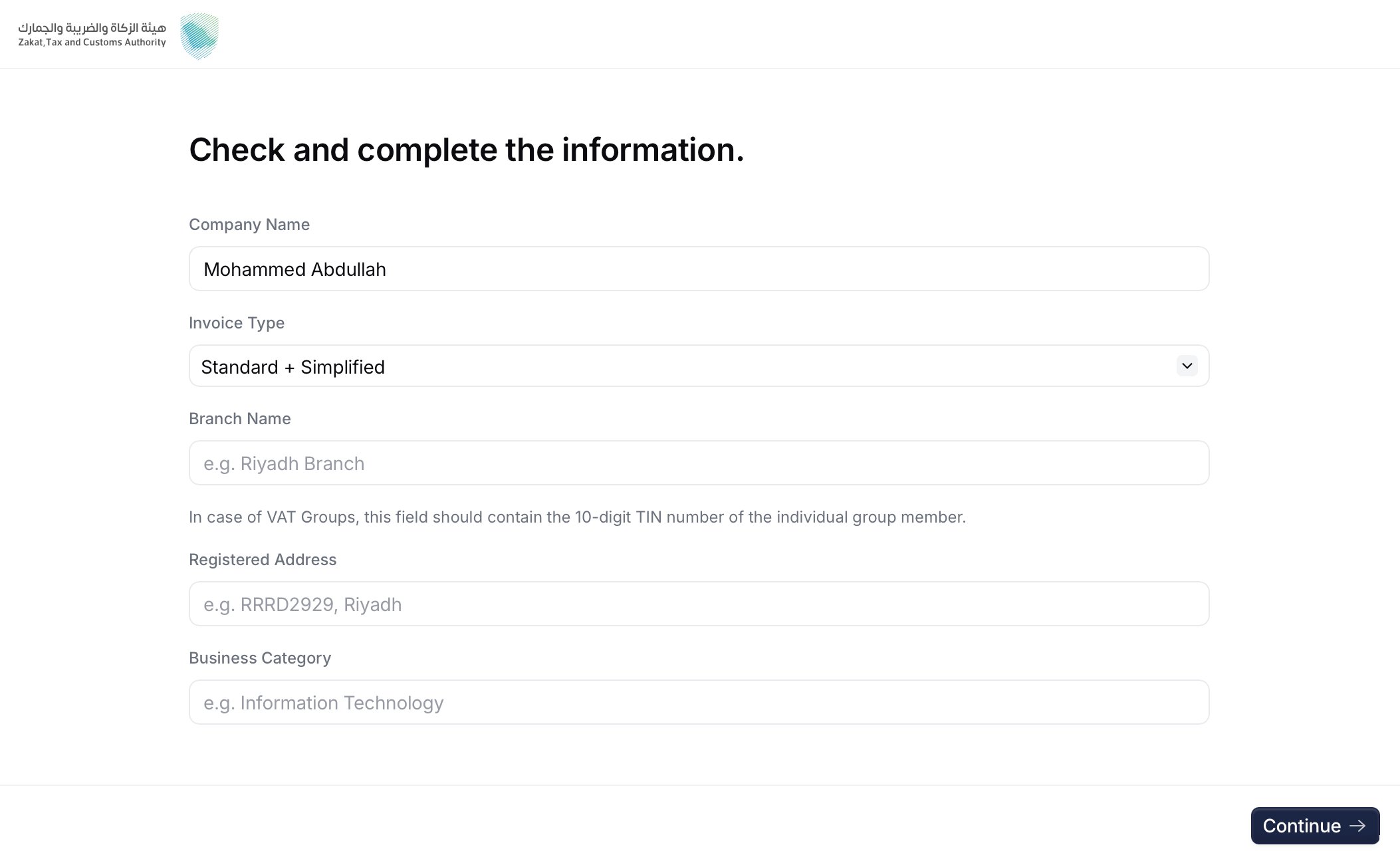
  <Step title="Company details">
    <Frame caption="Company details screen">
      <img src="https://mintcdn.com/invopop-fi-party-endpoints/pLsAjeEOYJoXsly1/assets/guides/sa-wizard-1.png?fit=max&auto=format&n=pLsAjeEOYJoXsly1&q=85&s=9e722f24c1d8296345a0a6bfcb146f5e" width="640" data-path="assets/guides/sa-wizard-1.png" />
    </Frame>

    The supplier provides the **invoice type** (`1000` standard, `0100` simplified, or `1100` both), **branch name**, and **business category**. These values feed the certificate request, together with the company name and the registered address taken from the party document.
  </Step>

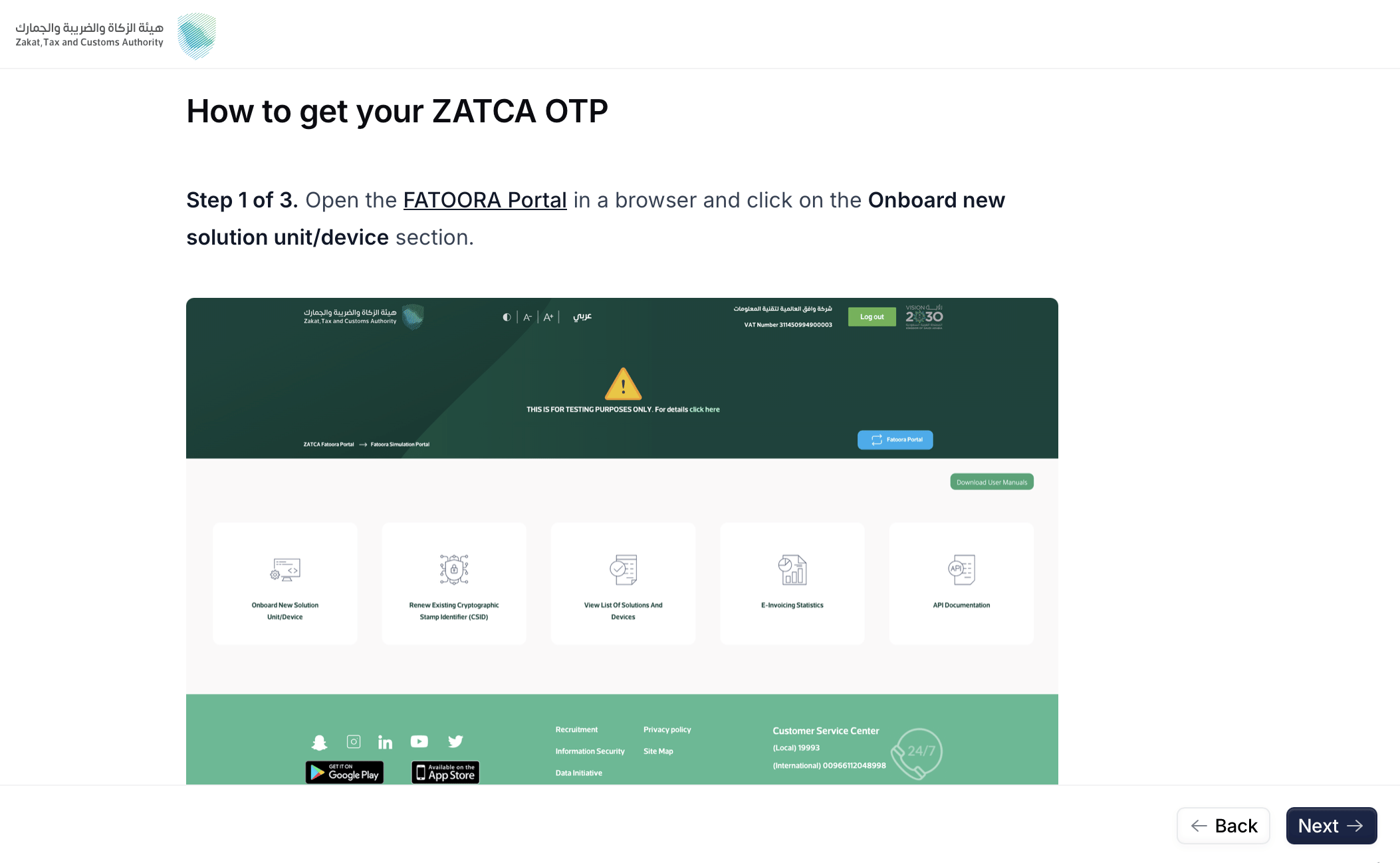
  <Step title="Get the OTP from FATOORA">
    <Frame caption="FATOORA instructions screen">
      <img src="https://mintcdn.com/invopop-fi-party-endpoints/pLsAjeEOYJoXsly1/assets/guides/sa-wizard-2.png?fit=max&auto=format&n=pLsAjeEOYJoXsly1&q=85&s=8dd90f6d9913a0df7a62e9534cfde413" width="640" data-path="assets/guides/sa-wizard-2.png" />
    </Frame>

    The supplier signs in to the FATOORA portal and generates a One-Time Password for the EGS unit. The wizard shows the relevant FATOORA screens.
  </Step>

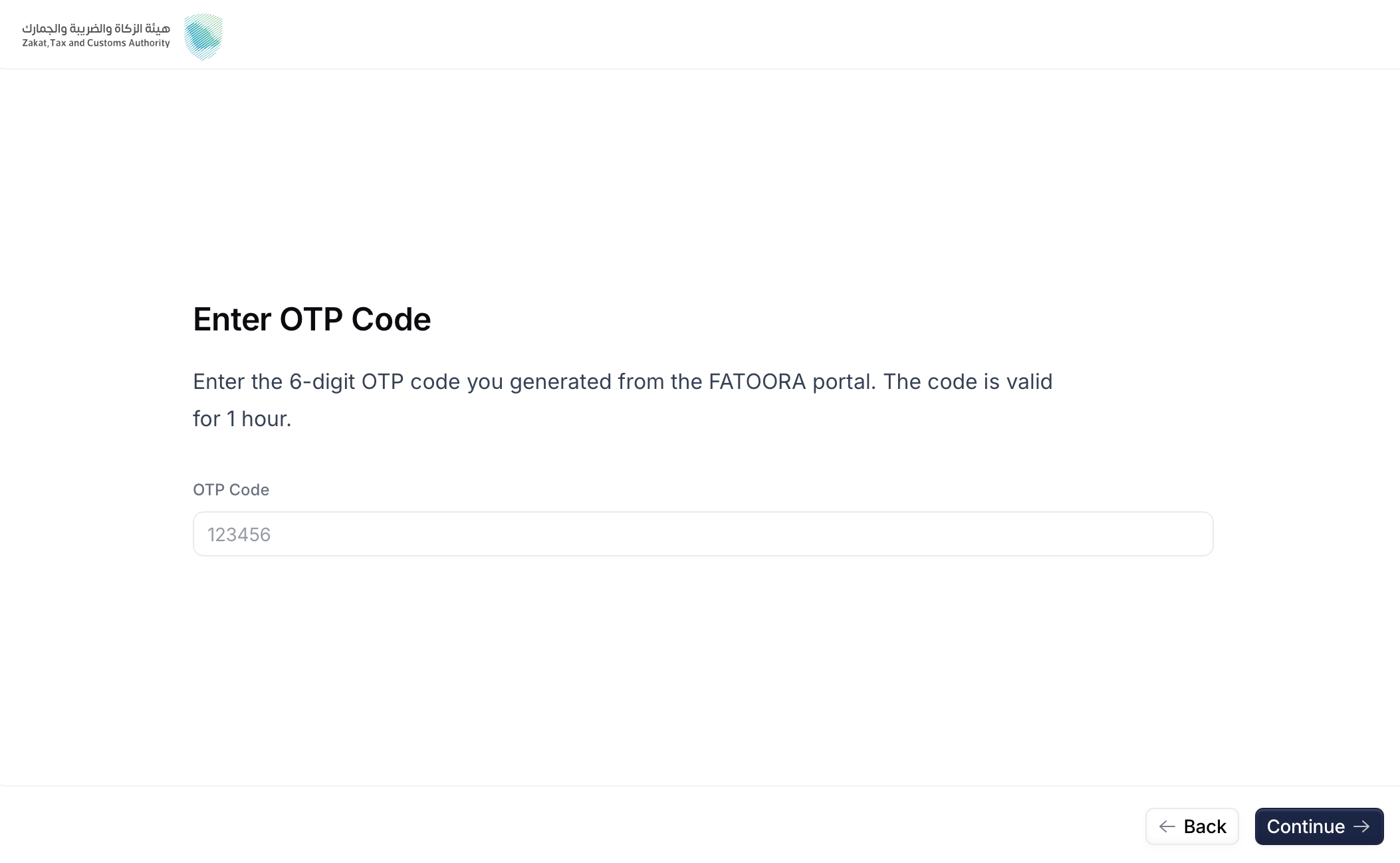
  <Step title="Enter the OTP">
    <Frame caption="OTP Code screen">
      <img src="https://mintcdn.com/invopop-fi-party-endpoints/pLsAjeEOYJoXsly1/assets/guides/sa-wizard-3.png?fit=max&auto=format&n=pLsAjeEOYJoXsly1&q=85&s=64174553de6d0aaa859a137e878b005d" width="640" data-path="assets/guides/sa-wizard-3.png" />
    </Frame>

    The supplier pastes the OTP and reviews the recap of the details that will be sent to ZATCA.
  </Step>

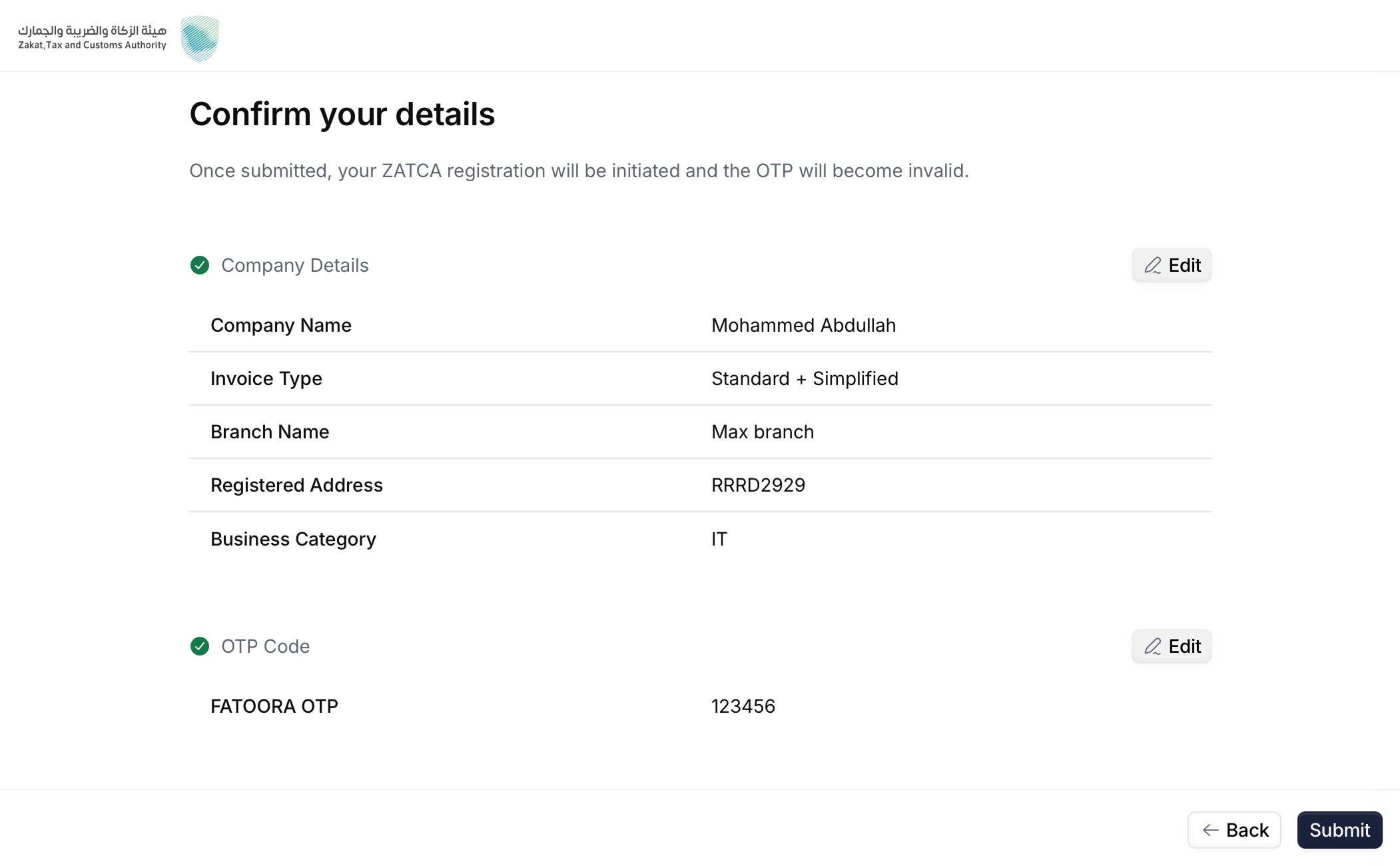
  <Step title="Confirm details">
    <Frame caption="Confirmation screen">
      <img src="https://mintcdn.com/invopop-fi-party-endpoints/pLsAjeEOYJoXsly1/assets/guides/sa-wizard-4.png?fit=max&auto=format&n=pLsAjeEOYJoXsly1&q=85&s=7b0008c7fd0b8f86ef8b9ca742b29a58" width="640" data-path="assets/guides/sa-wizard-4.png" />
    </Frame>

    Here you will make sure all the details you entered were correct. Click "Back" if you need to change anything.
  </Step>

  <Step title="Submit">
    <Frame caption="Submission screen">
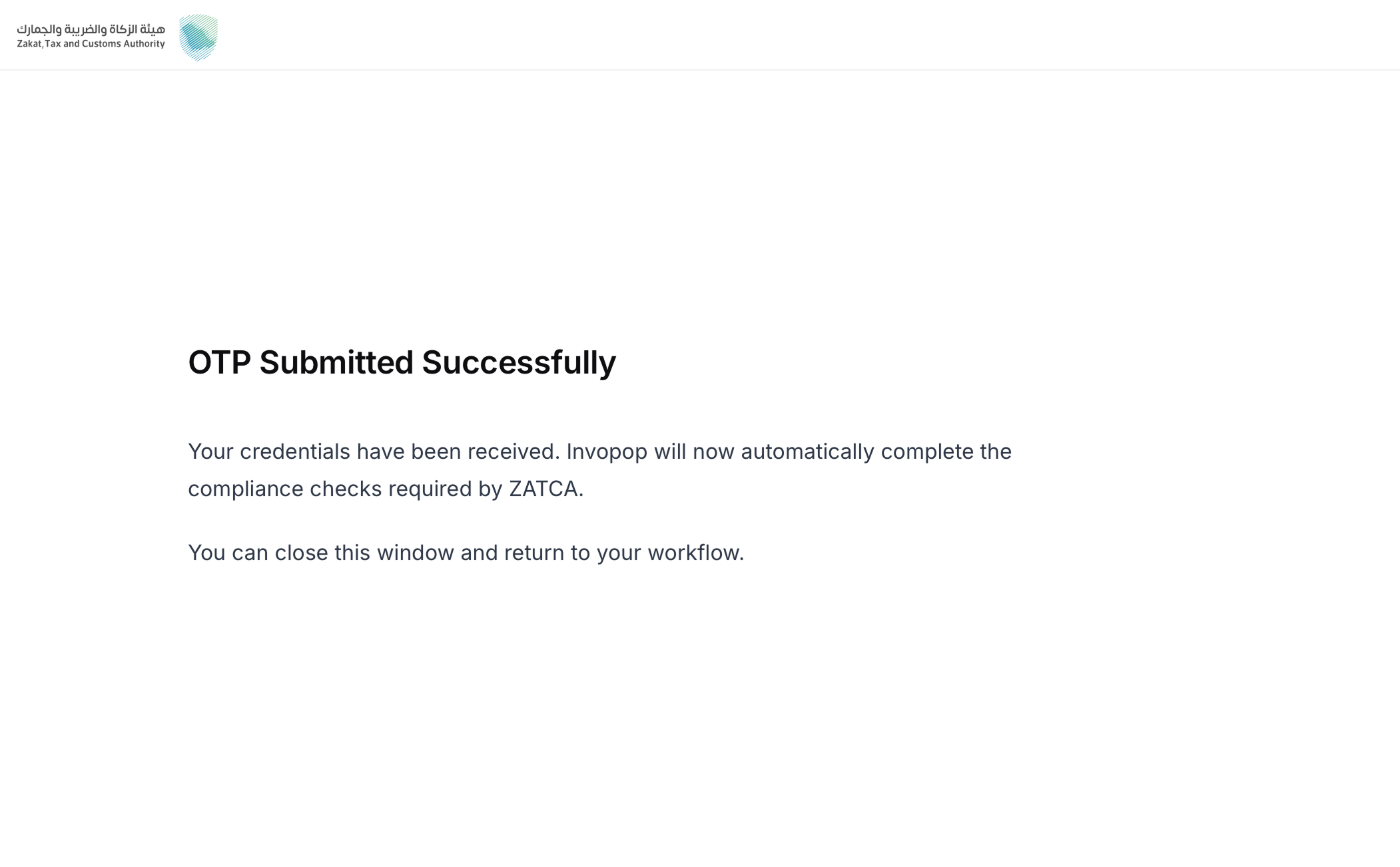
      <img src="https://mintcdn.com/invopop-fi-party-endpoints/pLsAjeEOYJoXsly1/assets/guides/sa-wizard-5.png?fit=max&auto=format&n=pLsAjeEOYJoXsly1&q=85&s=321db4468d306927f725508330b474ab" width="640" data-path="assets/guides/sa-wizard-5.png" />
    </Frame>

    Upon submit, Invopop requests the **Compliance CSID**, and stores the credentials. This unblocks the **Wait for ZATCA certificate upload** step in the workflow.
  </Step>
</Steps>

<Info>
  The invoice type chosen here determines which compliance samples Invopop submits: `1000` runs standard tax invoices, credit notes, and debit notes; `0100` runs the simplified equivalents; `1100` runs both sets.
</Info>

## Reading registrations

The ZATCA registrations dashboard lists every party the workspace has onboarded, ordered alphabetically by name, so you can confirm what a supplier is registered for without leaving the console.

Each row carries the registration's details: Name, Branch Name, Identity Code, Identity Scheme, Business Category, Registered Address, Tax Code, Simplified Invoices and Standard Invoices, showing which document types the party can submit, Status — *Registered*, or *Unregistered* and the Silo Entry the registration was started from. In sandbox, an extra Environment column precedes the tax code, separating Simulation from Developer registrations.

<Note>
  The **Name** in each row is a quick filter: selecting it opens the invoices tab filtered to that party's [cleared and reported chain](/guides/sa-zatca-clearance-reporting). The **Supplier Tax Code** column on that tab filters back the other way, to the registered party.
</Note>

## Unregistration (sandbox only)

Unregistering a party from ZATCA in production environment is handled by the **taxpayers**, directly in the **FATOORA portal**, signing in with their own credentials.

Invopop also provides an unregister action that removes the party and its stored credentials from **Invopop's internal systems only**. It does not touch the party's registration with ZATCA. It targets a single registration, the one that matches the party's VAT number and [supplier identity](#multi-branch-entities), so unregistering one branch leaves the other registrations under the same VAT number untouched.

<Warning>
  This action is intended for **testing in sandbox** — for example, to re-onboard the same VAT number and identity during development. It is **not** for live environments; unregistering at ZATCA is always done by the taxpayer in the FATOORA portal.
</Warning>

<Card iconType="duotone" title="ZATCA unregister supplier workflow (sandbox only)" icon="code-branch" href="https://console.invopop.com/redirect/workflows/new?template=sa-sa-unregister" horizontal>
  Add to my workspace →
</Card>

<Tabs>
  <Tab title="Workflow">
    <WorkflowDiagram workflow={saUnregisterWorkflow} />
  </Tab>

  <Tab title="Code">
    Copy and paste into a new [Empty Party workflow](https://console.invopop.com/redirect/workflows/new?template=empty-party).

    ```json ZATCA unregister supplier workflow theme={"system"}
    {
        "name": "ZATCA unregister supplier",
        "description": "Removes a supplier's registration from Invopop's internal systems",
        "schema": "org/party",
        "steps": [
            {
                "id": "572ac450-6fcf-11f1-b09d-79f60b032746",
                "name": "Set state",
                "provider": "silo.state",
                "summary": "Set state to `processing`{.state .processing}",
                "config": {
                    "state": "processing"
                }
            },
            {
                "id": "5c0e9910-6fcf-11f1-b09d-79f60b032746",
                "name": "Unregister supplier from ZATCA",
                "provider": "gov-sa.party.unregister"
            },
            {
                "id": "5e800e40-6fcf-11f1-b09d-79f60b032746",
                "name": "Set state",
                "provider": "silo.state",
                "summary": "Set state to `void`{.state .void}",
                "config": {
                    "state": "void"
                }
            }
        ],
        "rescue": [
            {
                "id": "60e4d940-6fcf-11f1-b09d-79f60b032746",
                "name": "Set state",
                "provider": "silo.state",
                "summary": "Set state to `error`{.state .error}",
                "config": {
                    "state": "error"
                }
            }
        ]
    }
    ```
  </Tab>
</Tabs>

## Multi-branch entities

A business can run several branches that all share the same VAT number while each branch onboards its own device or system. A single VAT number therefore often needs more than one registration, and Invopop supports this through the [GOBL identities](https://docs.gobl.org/draft-0/org/identity) field.

Every party registered with ZATCA is linked to a unique CSID certificate that identifies both its VAT number and its branch. Invopop gives each unique combination of VAT number and supplier identity its own CSID certificate, allowing them to act independently and through their own invoice chain.

Set the identity on the [`org.Party`](https://docs.gobl.org/draft-0/org/party) document as an entry in `identities` whose `type` is one of:

| `type` | Identity |
| - | - |
| `CRN` | Commercial Registration Number |
| `MOM` | Momrah license (Ministry of Municipality, Rural Affairs and Housing) |
| `MLS` | MLSD license (Ministry of Human Resources and Social Development) |
| `700` | 700 number (unified national number) |
| `SAG` | Sagia license (Ministry of Investment, formerly SAGIA) |
| `OTH` | Other identifier |

## FAQ

<AccordionGroup>
  <Accordion title="What do I need to onboard a party with ZATCA?">
    A workspace with the **Saudi Arabia** app enabled, and an `org/party` (the supplier) carrying:

    * a **company name**,
    * a Saudi **VAT registration number**,
    * an **identity** of type `CRN`, `MOM`, `MLS`, `700`, `SAG`, or `OTH`, and
    * a complete **national address** (building number, postal code, district, street, additional street, and country).

    During the hosted onboarding wizard the supplier provides the invoice type (`1000` standard / `0100` simplified / `1100` both), branch name, and business category — plus the FATOORA OTP. The company name and registered address are taken from the party document and shown read-only in the recap.
  </Accordion>

  <Accordion title="How long is the OTP valid?">
    **1 hour** from when it is generated in the FATOORA portal. If it expires, generate a new one and re-enter it in the wizard.
  </Accordion>

  <Accordion title="What is the difference between Developer and Simulation sandbox modes?">
    In **Developer** mode the OTP is not validated (any placeholder works) and you can only send invoices from ZATCA's fixed test VAT `399999999900003`. In **Simulation** mode the OTP must be real and you can send from any registered party.
  </Accordion>

  <Accordion title="Can I test in Simulation without a real FATOORA account?">
    No. Simulation requires a real FATOORA account and taxpayer to generate a valid OTP. Use **Developer** mode if you want to test the flow without a real account.
  </Accordion>
</AccordionGroup>

More available in our [Saudi Arabia FAQ](/faq/saudi-arabia) section.

***

<AccordionGroup>
  <Accordion title="🇸🇦 Invopop resources for Saudi Arabia">
    | | |
    | - | - |
    | Compliance | <Icon icon="https://assets.invopop.com/flags/sa.svg" /> [Invoicing compliance in Saudi Arabia](/compliance/saudi-arabia)<br /> <Icon icon="timeline" /> [Compliance timeline](/timelines/saudi-arabia) |
    | Apps | <Icon icon="https://assets.invopop.com/flags/sa.svg" /> [Saudi Arabia](/apps/saudi-arabia) |
    | Guides | <Icon icon="book" /> [Registration](/guides/sa-zatca-registration)<br /><Icon icon="book" /> [Clearance & reporting](/guides/sa-zatca-clearance-reporting) |
    | FAQ | <Icon icon="square-question" /> [Saudi Arabia FAQ](/faq/saudi-arabia) |
    | GOBL | <Icon icon="https://assets.invopop.com/icons/gobl.svg" /> [Saudi Arabia Tax Regime](https://docs.gobl.org/regimes/sa)<br /> <Icon icon="https://assets.invopop.com/icons/gobl.svg" /> [ZATCA Addon](https://docs.gobl.org/addons/sa-zatca-v1) |
    | GitHub | <Icon icon="github" /> [gobl.sa.zatca](https://github.com/invopop/gobl.sa.zatca) |
  </Accordion>
</AccordionGroup>

<Card title="Participate in our community" icon="forumbee" href="https://community.invopop.com" arrow="true" horizontal>
  Ask and answer questions about invoicing in Saudi Arabia →
</Card>


This documentation is built and hosted on [Mintlify](https://mintlify.com), a developer documentation platform.